Trezor Safe 3 Review (2026): Safe 3 vs Safe 5 vs Safe 7
Our Trezor Safe 3 review comes down to this: at $59, Trezor's US price on 10 October 2026, it carries the same EAL6+ certified secure element, open-source firmware and backup options as the two dearer models, and it saves money by cutting the screen and the comforts. Pay $129 for the Safe 5 if you want a colour touchscreen that makes checking addresses easier, and $249 for the Safe 7 only if you want Bluetooth signing with an iPhone, a battery or its second TROPIC01 chip.
Skip all three if you keep small sums you trade often on an exchange, or if you won't look after a written recovery backup: a hardware wallet guards the key, not careless habits. Many pages that rank for Trezor still review the Model One and Model T. Trezor no longer sells either, so this guide covers the three models it actually sells today, priced and dated.
Short answer: which Trezor for whom
Safe 3 ($59): for most people moving savings off an exchange for the first time. You will confirm a handful of transactions a year, so a small screen is a mild annoyance rather than a daily cost. It is also the cheapest way to get a certified secure element and open-source firmware in one device.
Safe 5 ($129): for anyone who signs often, holds a spread of tokens, or simply finds a 0.96-inch screen hard to read. The 1.54-inch colour touchscreen shows more of an address at once, and that matters because the device screen is the one place a hacked computer cannot fake. It also has a microSD slot and haptic feedback on the touchscreen.
Safe 7 ($249): for people who live on their phone. It is the only current Trezor with Bluetooth, a battery, Qi2 wireless charging and full iOS support, and it adds a second secure chip, TROPIC01, beside the certified one. It costs more than four times the Safe 3 and protects your key no better in day-to-day use; you are paying for convenience and a second layer of chip design.
Affiliate link to the manufacturer’s own store. We may earn a commission at no extra cost to you — it never moves a ranking, and buying direct from the maker (never a marketplace or reseller) is the point.
The current line-up at a glance (prices as of 10 Oct 2026)
Trezor's own comparison page lists exactly three models, read on 9 October 2026: Safe 7, Safe 5 and Safe 3. Each also comes in a Bitcoin-only edition, according to the product pages. Prices below are the US list prices on each product page, read on 10 October 2026. Retailers and promotions can differ, and prices outside the US are set separately.
| Safe 3 | Safe 5 | Safe 7 | |
|---|---|---|---|
| US list price | $59 | $129 | $249 |
| Screen | 0.96in monochrome, 128 x 64 | 1.54in colour, 240 x 240 | 2.5in colour, 520 x 380 |
| Input | Two buttons | Touchscreen with haptics | Largest touchscreen, haptics |
| Secure chips | EAL6+ secure element | EAL6+ secure element | EAL6+ secure element plus TROPIC01 |
| Connection | USB-C | USB-C | USB-C and Bluetooth 5.0+ |
| Power | From the cable | From the cable | 330mAh battery, Qi2 wireless charging |
| iPhone support in Trezor Suite | Limited | Limited | Full |
| Body | PMMA plastic | PC-ABS plastic, Gorilla Glass 3 | Aluminium unibody, Gorilla Glass 3 |
| Backups | 12, 20 or 24 words; multi-share | 12, 20 or 24 words; multi-share | 12, 20 or 24 words; multi-share |
| Bitcoin-only edition | Yes | Yes | Yes |
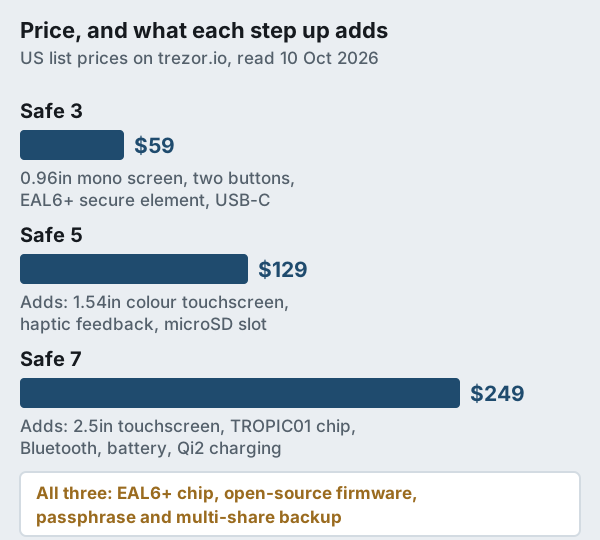
Read the price steps as two separate decisions. The $70 from Safe 3 to Safe 5 buys a screen you can actually read and a touch interface. The further $120 to the Safe 7 buys wireless use, a battery, a metal body and the second chip. Neither step makes your recovery phrase any safer on its own, so the question is how you will use the device rather than how much you hold.
Security architecture: secure element plus open source
A secure element is a chip built to keep a secret inside even when someone has the device in their hands and lab equipment on the bench. EAL6+ is a Common Criteria assurance level, a formal evaluation of how hard such a chip is to attack. All three current Trezors carry an EAL6+ certified secure element, the same level Ledger lists for its Nano S Plus, Flex and Stax; Ledger's Nano X is listed at EAL5+. Our explainer on secure elements versus open-source firmware covers the trade-off between the two ideas in depth.
Trezor's distinguishing choice is that the firmware running the wallet is open source. Outside researchers can read it, rebuild it and check that the code on your device matches what was published. That does not make a bug impossible, but it means a deliberate backdoor would be hard to hide. Certified chips usually run closed code under the chip maker's rules, so Trezor uses the secure element for what it is good at, guarding the secret, and keeps the wallet logic in the open.
The Safe 7 goes a step further. Next to its certified secure element sits TROPIC01, a secure chip whose design is open to audit, so the device does not rest on one closed chip alone. Trezor also says the Safe 7 is designed to receive quantum-secure updates. Treat that as a forward-looking claim rather than a feature you can use today; nobody can yet say what such an update will contain or when it will arrive.
Every model supports an optional passphrase, an extra word you add to your recovery phrase that opens a separate hidden wallet, and a PIN of up to 50 digits. Multi-share backup lets you split recovery across several shares so that no single piece of paper can empty the wallet, which is useful for inheritance planning or for keeping copies in different places.
Screens and usability: the real difference
The screen is where the security model meets your eyes. When malware on your computer swaps a destination address, the only honest copy of the transaction is the one the device displays, so a screen you can read comfortably is a screen you are more likely to check properly.
The Safe 3's 0.96-inch monochrome panel shows 128 x 64 pixels, and you move through screens with two buttons. It works, and for an occasional bitcoin withdrawal it is fine, but a long address or a smart-contract approval takes more paging, and that is exactly when people start tapping confirm without reading. The Safe 5's 1.54-inch colour touchscreen (240 x 240 pixels) shows far more at once and adds haptic feedback, so a tap feels like a button press.
The Safe 7 has Trezor's largest display, 2.5 inches at 520 x 380 pixels. Combined with Bluetooth and a battery, it is the one model you can carry and use away from a computer without a cable. Whether that is worth $120 over the Safe 5 depends on how often you sign from your phone; for a savings wallet opened twice a year, it rarely is.
Coins, apps and the Suite companion app
All three devices run the same firmware family and pair with Trezor Suite, the company's desktop and mobile app for receiving, sending and managing accounts. Trezor's comparison page lists support for thousands of coins and tokens as standard on all three models, with a few exceptions, so a dearer Trezor is not the way to get more coins. For some coins and decentralised apps you connect the device to a third-party wallet instead, so check Trezor's coin list for each asset you care about before you buy.
Platform support is where the models split. Trezor lists full iOS compatibility for the Safe 7 and limited iOS compatibility for the two cable-only models, while all of them work with Android, Mac, Windows and Linux. If an iPhone is your main device, that single line may decide it for you. Suite also helps against address-poisoning spam: Trezor says it blurs suspicious incoming transfers and marks them as unverified, and its support page advises never copying a destination from your transaction history.
Every model comes in a Bitcoin-only edition as well. Running firmware that supports one coin shrinks the code on the device, which some bitcoin holders prefer on principle. If you hold only bitcoin and expect that to stay true, it is worth a look; if you might add other assets later, the standard edition saves you buying twice.
Model One and Model T: still supported?
Yes, but neither is sold any more. Trezor labels both as discontinued. Its pages, read on 9 October 2026, promise the Model One maintenance through 2031 at the earliest and the Model T software updates over the same horizon, with critical security patches for both continuing to 2036 or later. Trezor names the Safe 3 as the Model One's successor and says the spirit of the Model T lives on in the Safe 5.
If you already own one, there is no emergency. Your recovery phrase works on any current model, so upgrading is a matter of restoring onto a new device. The main reason to move is that neither older model has the EAL6+ secure element every Safe model carries, which matters most if the device could fall into someone else's hands. What we would avoid is buying an old Model One or Model T today from a marketplace listing: you get a discontinued device with an unknown history.
Buying direct and checking the device
Buy from trezor.io or a reseller Trezor lists, never from a marketplace seller or a secondhand listing, however good the price. A tampered device or a pre-filled recovery card is the oldest hardware-wallet trick there is, and our guide to buying direct versus marketplaces explains how those setups work. When the device arrives, check the packaging seal, connect it only through Trezor Suite downloaded from trezor.io, and follow the authenticity check Suite walks you through on first connection.
Expect phishing even when you buy correctly. In August 2026 a breach at ShipMonk, Trezor's US fulfilment partner, exposed order details such as names, emails and postal addresses for 80,689 customers in total; Trezor says its own systems, devices and backups were not affected. A month later, in September 2026, someone misused Brevo, the service that sends Trezor's newsletter, to push a bogus 'critical security alert' to roughly 347,000 people on that list, asking them to enter their backups. Any message asking for your recovery words is a scam, whatever logo it carries; our page on hardware wallet scams lists the tells.
Setup itself takes about as long as making a coffee and writing down a list of words carefully. Our hardware wallet setup guide goes through it step by step, and seed phrase backup best practices covers where to keep the words and whether metal is worth it.
Which Trezor should you buy?
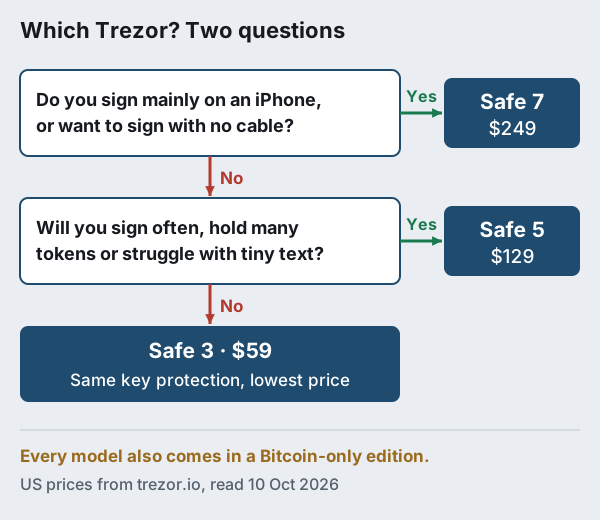
Work through two questions. First, is an iPhone your main signing device, or do you want to sign without a cable at all? If yes, the Safe 7 is the only current Trezor that does it. If not, ask whether you will sign more than a few times a year or hold many different tokens. If you will, the Safe 5's screen earns its extra $70. If you won't, the Safe 3 gives you the same protection for the key at the lowest price.
Whichever you choose, order from the manufacturer. You can see current Trezor prices on trezor.io (we may earn a commission, which never changes the order of our recommendations). If you are still weighing the two big brands against each other, our Ledger vs Trezor comparison sets the security models side by side.
Affiliate link to the manufacturer’s own store. We may earn a commission at no extra cost to you — it never moves a ranking, and buying direct from the maker (never a marketplace or reseller) is the point.
Edge cases: when the cheap one is wrong, and when none fits
The ranking above holds for most readers, but a few situations change the answer. These are the ones we would think through before ordering.
- You approve DeFi transactions every week. Contract approvals carry more detail than a payment. On a 128 x 64 screen that is slow to verify, so the Safe 5 is the realistic floor.
- You are planning for inheritance. Multi-share backup is on every model, so the cheapest device works; what matters is documenting where the shares are and who can combine them.
- You distrust wireless radios on principle. The Safe 3 and Safe 5 have no Bluetooth at all, which settles it without paying for the Safe 7.
- You want to sign without any cable or radio. No current Trezor is air-gapped; our guide to air-gapped hardware wallets covers devices that sign by QR code.
- You hold only a small amount. Below the price of the device itself, a well-secured phone wallet may be enough for now; our guide on whether you need a hardware wallet helps you decide.
Trezor Safe 3, Safe 5 and Safe 7: quick answers
Is the Trezor Safe 3 worth it in 2026?
What is the difference between the Trezor Safe 3 and Safe 5?
Does the Trezor Safe 3 work with an iPhone?
Is the Trezor Model T still supported?
Is the Trezor Safe 7 worth the extra money?
Ready to choose a device? See the best hardware wallets, ranked by security, or follow the safe setup guide before you move a single coin.