Ledger Nano S Plus vs Nano X vs Flex vs Stax (and Nano Gen5): Which Ledger?
For most people the right Ledger is the cheapest one that works with the phone or computer they actually use. If you sign from a desktop or an Android phone over a cable, the Nano S Plus at $69 protects your keys with the same EAL6+ secure chip as models costing several times more. If you want to sign from an iPhone, the cheapest option is the Nano X at $99, which adds Bluetooth and a battery but is the one model in the range with an EAL5+ rather than EAL6+ chip. The Nano Gen5 ($179), Flex ($249) and Stax ($399) buy a large E Ink touchscreen, NFC and a longer battery: real comfort, not more key security.
Prices here are Ledger's own US listings, read on 10 Oct 2026, and specs come from Ledger's comparison and product pages checked on 9 October 2026. Ledger renamed its desktop and mobile app from Ledger Live to Ledger Wallet; you will see both names around the web. Nothing below comes from a lab test of ours.
The line-up side by side
Ledger now sells five devices, and the old naming no longer tells you much: the Nano Gen5 is not a small Nano but an E Ink touchscreen device closer to the Flex. The cleanest way to read the range is in two tiers. The two classic Nanos have a small OLED screen and two buttons. The three newer devices have a large E Ink touchscreen, Bluetooth, NFC and a battery rated for up to 10 hours of use.
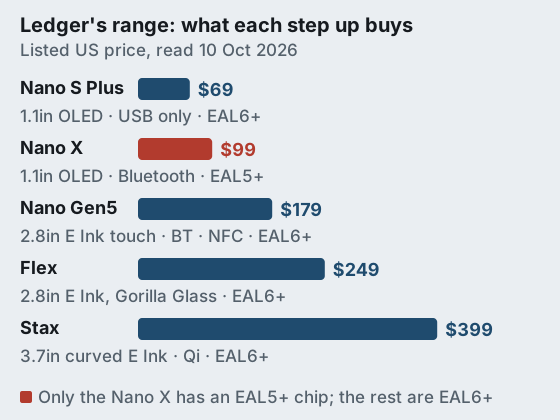
| Model | Price | Screen | Connections | Battery | Secure chip |
|---|---|---|---|---|---|
| Nano S Plus | $69 | 1.1in OLED, two buttons | USB only; no iOS | None | CC EAL6+ (ST33K1M5) |
| Nano X | $99 | 1.1in OLED, two buttons | USB-C, Bluetooth | About 5 hours | CC EAL5+ |
| Nano Gen5 | $179 | 2.8in E Ink touch | USB-C, Bluetooth, NFC | Up to 10 hours | CC EAL6+ |
| Flex | $249 | 2.8in E Ink touch, Gorilla Glass | USB-C, Bluetooth, NFC | Up to 10 hours | CC EAL6+ |
| Stax | $399 | 3.7in curved E Ink touch | USB-C, Bluetooth, NFC; Qi charging | Up to 10 hours | CC EAL6+ |
Two things jump out of that table. First, the price steps are mostly about the screen: from $99 to $179 you move from a postage-stamp OLED to a 2.8-inch E Ink touchscreen, and from $249 to $399 you are paying for a larger curved display and wireless charging. Second, the security chip does not climb with price. Four of the five carry an EAL6+ certified secure element; the Nano X, at $99, carries EAL5+. Older comparisons that quote the Nano X at a higher price or the S Plus at $79 are out of date.
What every model shares
Whichever you buy, the security model underneath is the same. The private key is generated and kept in the secure element, transactions are confirmed on the device's own screen, and the device uses a standard 24-word recovery phrase that you write down at setup. All five run Ledger's own operating system, which is closed source; Ledger relies on the chip's certification and its own security team rather than public code review. That is the core difference from Trezor, whose firmware is open, and our Ledger vs Trezor comparison covers it in depth.
They also share the same companion app and the same coin support, so you are not buying broader asset coverage by spending more. Ledger's Nano X page lists more than 500 cryptocurrencies supported in the Ledger Wallet app and more than 15,000 coins and tokens in total, and that applies across the range. Storage for installed apps is finite on every device (Ledger rates the Nano X for up to 100), which only matters if you hold a very long list of different chains.
Bluetooth and battery: does it matter?
Bluetooth exists so you can sign from a phone without a cable, and for iPhone owners it is the deciding feature, because the Nano S Plus does not work with iOS at all. The common worry is that a wireless link exposes the key. It does not change where the key lives: the link only carries the unsigned transaction in and the signature out, and you still approve every transaction by pressing or tapping the device itself. What Bluetooth adds is a slightly larger attack surface on the device and the phone, which is why some security-minded owners leave it switched off and plug in when they can.
The battery is the less discussed cost. A device with a battery is a device that eventually needs charging, and a Nano X left in a drawer for a year may need a top-up before it turns on. The S Plus has no battery and draws power over its cable, which suits a device that comes out a few times a year. If your wallet is mostly a vault, that simplicity is a feature.
Screens: E Ink touch vs the small OLED
The screen is where you check what you are signing, so a bigger one is not only about comfort. On the small OLED Nanos, a long address scrolls across the display a few characters at a time, which tempts people to skim. On the Gen5, Flex and Stax, the full address and amount fit on an E Ink touchscreen you can read at a glance, and E Ink holds its image without drawing power. For anyone who interacts with smart contracts or sends large amounts, reading the whole transaction comfortably is a security benefit as much as a design one.
Between the three E Ink models the differences are physical. The Gen5 and Flex share a 2.8-inch screen, with the Flex adding Gorilla Glass at a higher price; the Stax has the largest, curved 3.7-inch display and Qi wireless charging. NFC on all three lets you tap the device to a phone rather than pairing. None of those changes how the key is protected.
The Nano X's EAL5+ chip: a real difference or a footnote?
Common Criteria assurance levels describe how rigorously a chip's design and testing were evaluated against attacks, with EAL6+ requiring more than EAL5+. In practice both levels sit far above a general-purpose microcontroller, and the threat they defend against, someone with physical possession of your device and laboratory equipment, is not how most people lose funds. So the Nano X's lower rating is a genuine difference on paper and a footnote for most buyers. It matters if your threat model includes targeted physical theft; it does not matter much if your real risks are phishing and lost backups, which no chip certification addresses.
Recover: the optional seed backup service, and the criticism
Ledger Recover is an optional, paid subscription that backs up your recovery phrase without you writing anything down. According to Ledger's Recover page, the device encrypts the seed and splits it into three fragments held by three separate companies, Coincover, Ledger and EscrowTech, and any two of the three can restore access after your identity is verified online by two independent companies. Ledger's US store listed it at $99.99 a year, or $49.99 for six months, when we read it on 10 Oct 2026. The Nano S Plus supports Recover through the desktop app only, and the original Nano S does not support it.
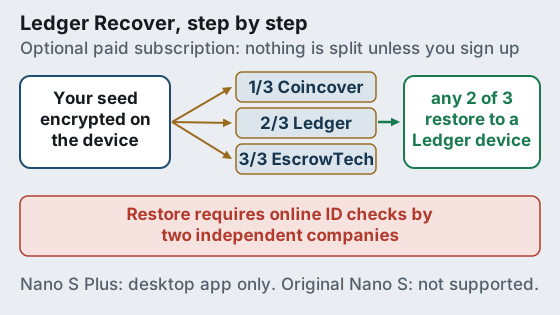
When Ledger announced Recover in 2023, the criticism was not that the service was compulsory, because it is not, but that it showed the device firmware could, with the owner's consent, send an encrypted form of the seed off the device. For people who had chosen Ledger on the assumption that the seed could never leave the secure element, that was a change in what they were trusting. It is worth being precise about what this means today. If you never subscribe, no fragments exist. The capability is the same on every model, so it is not a reason to prefer one Ledger over another; it is a reason to decide whether you are comfortable with Ledger's closed firmware at all.
Who might sensibly use Recover? Someone whose realistic risk is losing a paper backup or leaving heirs unable to find it, and who is comfortable trading some self-reliance for identity-verified recovery through companies. Who should not? Anyone who wants no third party to hold any part of their seed, even encrypted. Our seed phrase backup guide covers the do-it-yourself alternatives.
Which Ledger should you buy?
- Nano S Plus ($69) if you use a computer or an Android phone with a cable and want the cheapest EAL6+ device. The best value in the range for a wallet that mostly sits in a drawer.
- Nano X ($99) if you need to sign from an iPhone and want to spend as little as possible. Accept the EAL5+ chip and a battery to look after.
- Nano Gen5 ($179) if you want the large E Ink touchscreen and NFC at the lowest price. For most people who want the modern design, this is now the sensible pick.
- Flex ($249) if you want the same screen size with a tougher glass front.
- Stax ($399) if you want the largest display and wireless charging and the price does not matter to you.
If you are unsure, the decision rule is simple: pick the S Plus unless you need an iPhone connection or a big screen, then step up only as far as you need. Every model is sold on Ledger's own store, which is the only place we would buy one. If you have not yet settled on Ledger at all, our hardware wallet ranking compares it with Trezor, Tangem and the air-gapped devices.
Affiliate link to the manufacturer’s own store. We may earn a commission at no extra cost to you — it never moves a ranking, and buying direct from the maker (never a marketplace or reseller) is the point.
Edge cases and older devices
- You own an original Nano S. It is no longer in the line-up and does not support Recover. When you upgrade, restore its recovery phrase on the new device and your funds appear, because they were never stored on the old one.
- You switch from iPhone to Android or back. The Nano S Plus only works with Android or a computer; every other model supports both phones through Bluetooth.
- Your battery model will not turn on. Charge it over USB-C before assuming a fault. A dead device never means lost funds if you have the recovery phrase.
- You want two devices. You can restore the same recovery phrase onto a second Ledger as a spare. Both then control the same funds, so both need the same physical care.
The thread through all of these is that the recovery phrase, not the device, is your wallet. Any Ledger, or any other standards-based device, can be replaced by restoring that phrase, which is why losing a device is an inconvenience and losing the phrase is a disaster. If you are unsure whether you have a working backup, test it with a small amount on a spare device before you need it. Our guide to a lost or broken hardware wallet walks through the restore.
Buying direct and first-day checks
Order from the maker, not a marketplace reseller, and reject any device whose packaging has been opened or which arrives with a recovery phrase already written on the card in the box. A legitimate device always asks you to create a new wallet and generates the phrase on its own screen. Ledger's 2020 customer-database breach, which Ledger says exposed about a million email addresses and around 272,000 postal records, is a reminder to expect phishing aimed at owners: Ledger will not ask you for your 24 words by email, letter or phone. Our notes on buying direct and hardware wallet scams list the patterns, and the setup guide covers the first hour with a new device.
Straight answers
What is the difference between the Ledger Nano S Plus and the Nano X?
Is the Ledger Nano X worth it over the Nano S Plus?
What is the Ledger Nano Gen5?
Do all Ledger devices support the same coins?
Do I have to use Ledger Recover?
Ready to choose a device? See the best hardware wallets, ranked by security, or follow the safe setup guide before you move a single coin.