What Is a Cold Wallet? How Hardware Wallets Keep Keys Offline
A cold wallet is any way of holding crypto in which the private keys, the secrets that authorise spending, are created and kept on something that never touches the internet. In practice that almost always means a hardware wallet: a small dedicated device that stores the key, shows you each transaction on its own screen, and signs it internally so the key never reaches your phone or computer. If you hold more crypto than you would shrug off losing and plan to keep it, a cold wallet is the standard answer; if you trade daily or hold pocket money, a well-run hot wallet is usually enough.
That definition hides the part that matters. Your coins do not live in the device; they live on the blockchain, and whoever has the key can move them from anywhere. A cold wallet removes the remote ways of stealing that key. It does not remove the ways of tricking you into giving it away, and the second list is where most losses now happen. This guide covers both.
Cold wallet, hardware wallet, hot wallet: the terms
The vocabulary is used loosely, so it helps to pin it down. "Cold" and "hot" describe where the private key sits. A hot wallet keeps it on a connected device, such as a phone app or a browser extension. A cold wallet keeps it offline. "Hardware wallet" names the most common kind of cold wallet, a purpose-built gadget, and "cold storage" is the practice of keeping long-term holdings that way. Every hardware wallet is a cold wallet; not every cold wallet is a hardware wallet, since a recovery phrase stamped on steel and never typed into anything is also cold.
A separate axis is custody: who holds the key at all. Coins on an exchange are custodial, because the exchange controls the keys and your account is only a claim against it, which is why a phrase holders had used for years, "not your keys, not your coins", came back into wide use after the 2022 platform failures. Hot and cold wallets are both self-custody. A hardware wallet sits at the strong end of both axes: you hold the key, and the key is offline. The trade is that recovery is entirely your job.
How a hardware wallet actually works
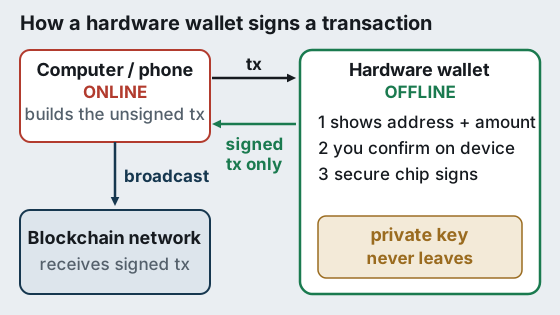
A hardware wallet splits a transaction into the part that needs the internet and the part that needs the key, and keeps those on separate machines. Your computer or phone runs the wallet app, looks up balances and builds an unsigned transaction. That unsigned transaction goes over USB, Bluetooth, NFC or a QR code to the device. The device draws the destination address and amount on its own screen, waits for you to confirm with a button or touch, signs inside its secure chip, and passes back only the signature. The app then broadcasts the signed transaction to the network.
Two design choices separate good devices from weak ones. The first is a secure element, a tamper-resistant chip of the kind used in bank cards and passports, which makes pulling the key out of a stolen device very hard. Every current model from Trezor and Ledger uses one certified to EAL6+, except Ledger's Nano X at EAL5+, per each maker's comparison page checked 9 Oct 2026. The second is auditability: Trezor publishes its firmware as open source, while Ledger's operating system is closed and relies on certification. We set out that trade in our secure element vs open-source guide.
The main types of cold wallet
All cold wallets do the same job, so the differences are about how the device talks to your phone or computer, whether it has a screen you can trust, and how you back it up. Four families cover nearly everything on sale.
- USB and Bluetooth devices (Trezor Safe line, Ledger Nano line). A screen and buttons or a touchscreen, a recovery phrase as backup. The default choice for most people.
- NFC cards and rings (Tangem). No screen or battery; the phone acts as the display and two or three cards replace the recovery phrase. Our hardware wallet ranking weighs that trade against the screened devices.
- Air-gapped QR devices (for example Keystone). No data cable at all; transactions travel as QR codes the device scans and displays. Our air-gapped wallet explainer covers when that extra isolation is worth it.
- Paper or metal backups only. The key exists as written words and nothing else. Truly offline, but you must import it into software to spend, and the moment you do, it is no longer cold.
Which family is right depends less on security grades than on habits. If you will verify addresses carefully, any of the first three keeps the key out of reach of online attackers. If the idea of guarding 24 words on paper is what has kept you on an exchange, a card set removes that obstacle. If you want the strictest separation from a possibly infected computer, the air-gapped devices are built for it. Paper alone suits almost nobody today, since the devices are cheap and remove the error-prone step of typing a phrase into software.
Hot wallet vs cold wallet vs exchange
The useful comparison is not "safe versus unsafe" but which failures each option is exposed to. An exchange account is exposed to the platform freezing withdrawals or failing, and to account takeover. A hot wallet removes the platform but keeps the key on a device that runs other software, browses the web and installs updates, so malware and malicious extensions can reach it. A cold wallet removes both of those and leaves you with physical and human risks: losing the device and the backup, or being persuaded to reveal or approve something you should not.
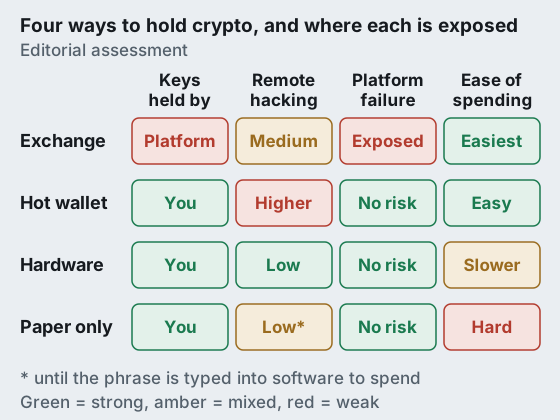
Many holders end up using more than one. A hot wallet with a small spending balance covers day-to-day use, while the bulk sits on a hardware wallet that only comes out to receive or to move larger sums. That split mirrors cash in a wallet and savings in a bank, and it keeps the convenient tool from holding the money you would hate to lose.
What a hardware wallet protects you from, and what it doesn't
It protects the key from remote theft. Malware that scrapes key files, a browser exploit, a cloud backup that leaks, a compromised laptop: none of these can read a key that is not on the laptop. It also protects you from custodial failure, because no company can freeze or lend out coins whose keys only you hold.
It does not protect you from being talked out of your recovery phrase, and that is now the dominant attack. A concrete example: on 9 September 2026, an attacker abused Trezor's third-party newsletter provider to send a fake "Critical Security Alert" to about 347,000 subscribers asking them to re-enter their wallet backup. Trezor reported that roughly 2,500 people clicked before the campaign was taken down and that no Trezor product or system was breached. The device was never the weak point; the inbox was. Ledger's 2020 customer-database breach, which exposed about a million email addresses and around 272,000 postal records according to Ledger, fed years of the same kind of phishing.
- Seed phishing. Any website, email, app or "support agent" that asks for your recovery words is an attack. The phrase is only ever entered on the device itself, during recovery.
- Malicious approvals. On smart-contract chains, a signature can grant a contract permission to move tokens later. The device signs what you approve, so read what the screen says and reject what you do not understand.
- Address poisoning. Scammers send tiny transfers from lookalike addresses so a copied address from your history is theirs. Trezor's guidance is to check every character on the device screen and never copy from history.
- Physical loss. A lost device costs nothing if the backup is safe. A lost device and a lost backup cost everything.
Security note: no legitimate wallet maker will ever ask for your recovery phrase, by email, in an app, on a website or over the phone. A message that does is, by definition, an attack, however official it looks.
Do you need a cold wallet? A threshold rule
A cold wallet earns its place when two things are true: the amount would genuinely hurt to lose, and you intend to hold it rather than trade it this week. Our rule of thumb is to compare what you hold with what the device costs. If your crypto is worth only a few times the price of a device, a carefully used hot wallet is a reasonable home and the money is better kept for diversification. Once your holdings are worth many times the device and you plan to leave them alone for months, the one-off cost is small next to what it protects.
Two exceptions push people towards cold storage earlier. If you keep coins on an exchange because self-custody feels intimidating, a simple device is a better first step than leaving everything with a platform. And if anyone else in your household might need access one day, a device plus a documented backup is easier to hand over than an exchange login. Our longer guide to whether a hardware wallet is worth it works through more scenarios.
What a cold wallet costs in 2026
Many explainers still quote older prices. These are the makers' own listed US prices, read on the dates shown. Ledger's cheapest current device, the Nano S Plus, listed at $69.
| Device | Listed price | What you get | Read |
|---|---|---|---|
| Trezor Safe 3 | $59 | USB-C device, small mono screen; recovery phrase | trezor.io, 10 Oct 2026 |
| Ledger Nano S Plus | $69 | USB device with a screen; recovery phrase | shop.ledger.com, 10 Oct 2026 |
| Tangem (3 cards) | $69.90 | NFC card set, no screen; cards are the backup | tangem.com, 10 Oct 2026 |
| Trezor Safe 5 | $129 | Colour touchscreen, USB-C | trezor.io, 10 Oct 2026 |
| Trezor Safe 7 | $249 | Larger touchscreen, Bluetooth, battery, two secure chips | trezor.io, 10 Oct 2026 |
The cheapest model from a reputable maker protects the key as well as the flagship. Paying more buys a bigger or touch screen, Bluetooth and a battery, or a second secure chip, not a different security category. If you want the open-source route at the lowest price, the Safe 3 is the entry point in Trezor's line; if the recovery phrase is your worry, Tangem's three-card set removes it. For a side-by-side of the wider field, including Ledger and the air-gapped devices, see our best hardware wallet ranking.
How to buy one safely
Supply-chain tampering is the one attack a cold wallet cannot defend against after the fact, so where you buy matters as much as what you buy. Order directly from the manufacturer's own store, typed into the address bar rather than reached through an ad. Reject any device that arrives with its packaging opened, with a recovery phrase already printed on a card, or that does not ask you to create a new wallet on first use. A pre-filled recovery card is a theft in progress, not a convenience. Our note on buying direct versus marketplaces lists the warning signs.
Once it arrives, set it up on a computer you trust, write the recovery phrase on paper or steel by hand, and never photograph it or type it into anything except the device. Send a small test amount, then practise a recovery before you move the full balance. The setup guide walks through each step, and our seed phrase backup guide covers storing the words.
Straight answers
What is a cold wallet in simple terms?
Is a cold wallet the same as a hardware wallet?
How do hardware wallets work?
Can a cold wallet be hacked?
What are the benefits of a hardware wallet?
Ready to choose a device? See the best hardware wallets, ranked by security, or follow the safe setup guide before you move a single coin.